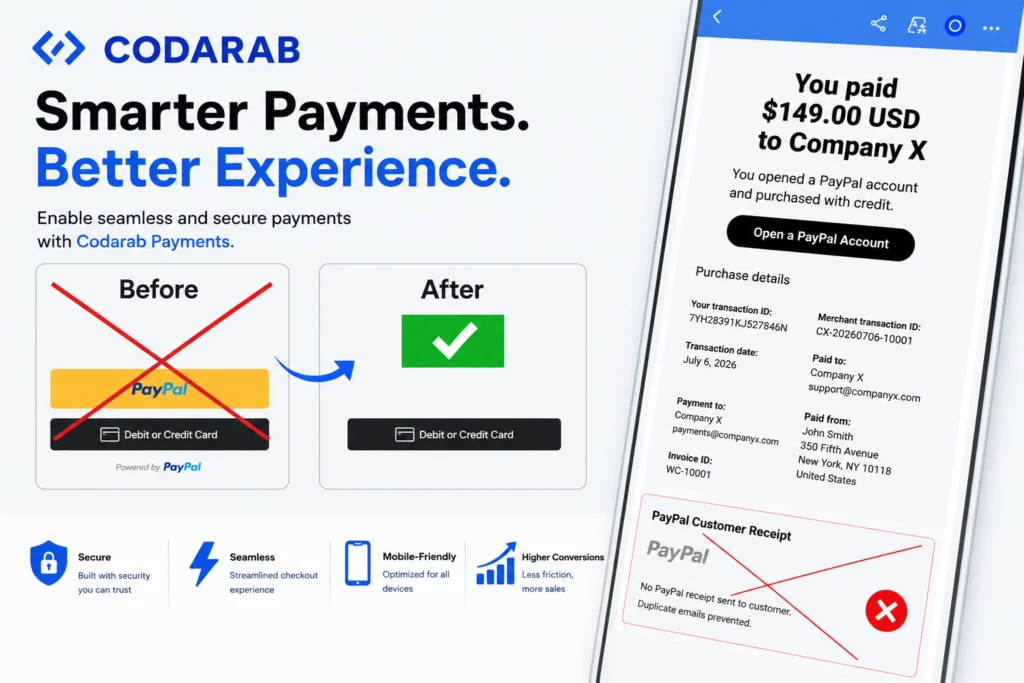
Codarab Payments V10.8.5 has officially arrived, and it is one of the most important updates ever released for this popular WooCommerce payment plugin. Whether you run a small online shop or a large e-commerce operation, this new version brings five powerful improvements that directly impact your store’s speed, your checkout conversion rate, your customer experience, and — for the first time — your business privacy and confidentiality on PayPal.
In this complete guide, we will walk you through every single new feature included in Codarab Payments V10.8.5, explain why each one matters for your WooCommerce store, show you a full video demonstration, and tell you exactly how to update. We will also show you where to get an official plan for the plugin on the official website, codarab.com. Let’s dive in.
What Is Codarab Payments?
Before we explore the new features, here is a quick refresher for readers who are new to the plugin. Codarab Payments is a WordPress and WooCommerce payment plugin designed to make accepting online payments simple, fast, and flexible. It allows store owners to accept payments through PayPal as well as through credit and debit cards, giving customers the freedom to pay the way they prefer.
What makes Codarab Payments stand out from many other WooCommerce payment gateways is its focus on real-world seller needs: a clean checkout flow, full control over which payment buttons appear on your store, and continuous updates that respond directly to feedback from merchants. Version 10.8.5 is a perfect example of that philosophy in action. Every one of the five new features in this release solves a concrete, practical problem that sellers have reported.
If you do not have the plugin yet, you can learn more and choose a plan that fits your business on the official website: codarab.com.
What’s New in Codarab Payments V10.8.5? The 5 New Features Explained
This release focuses on four key pillars: performance, checkout control, cleaner communication with customers, and business confidentiality. Here is a complete, in-depth breakdown of every new feature included in version 10.8.5.
1. Faster Site Performance — Slowness Issue Fixed
The first and perhaps most immediately noticeable improvement in Codarab Payments V10.8.5 is speed. In previous versions, some store owners reported that their website felt slower than expected. After investigation, the cause was identified: the connection between the plugin and the Codarab server was adding unnecessary loading time to the pages of the store.
Version 10.8.5 completely fixes this site slowness issue. The way the plugin communicates with the Codarab server has been optimized, so your pages load faster and your visitors no longer experience delays caused by the payment plugin running in the background.
Why does this matter so much? Because page speed is not just a comfort feature — it is a business metric:
- Better SEO rankings: Google uses page speed and Core Web Vitals as ranking signals. A faster WooCommerce store has a better chance of ranking higher in search results, which means more organic traffic for your products.
- Higher conversion rates: Studies consistently show that even a one-second delay in page load time can significantly reduce conversions. When your store loads quickly, more visitors complete their purchases.
- Lower bounce rates: Shoppers are impatient. A slow store pushes potential customers back to the search results and straight into the arms of your competitors. A fast store keeps them browsing.
- Better mobile experience: A large share of e-commerce traffic now comes from mobile devices, where connections can be slower. Every millisecond saved by the plugin makes a real difference for mobile shoppers.
In short, after updating to V10.8.5, your WooCommerce store gets a genuine performance boost without you having to change a single line of code or install any additional caching tools. The fix works silently in the background from the moment you update.
2. New Option to Block Access to the Long PayPal Form
The second new feature gives you more control over your checkout experience. Codarab Payments V10.8.5 introduces a brand-new option that lets you block access to the long PayPal form.
If you have ever watched a customer go through the PayPal checkout, you know that PayPal can sometimes present a long, detailed form during the payment process. While this form works, it can also slow down the purchase, add friction, and increase the risk that a hesitant customer abandons the cart before completing the payment.
With the new blocking option enabled, you can prevent that long PayPal form from being part of your checkout flow. The result is a checkout that is:
- Shorter: Fewer fields and fewer steps between “Add to Cart” and “Payment Complete.”
- Simpler: Customers see only what they truly need to finish the purchase, with no unnecessary detours.
- More conversion-friendly: Every step you remove from checkout reduces cart abandonment. A streamlined payment flow directly increases the percentage of visitors who become paying customers.
The best part is that this is an option, not a forced change. You decide, from your admin settings, whether to block the long PayPal form or keep it available. This flexibility means the plugin adapts to your business strategy instead of forcing a one-size-fits-all behavior on your store.
3. No More Duplicate Payment Receipts Sent to Customers
The third improvement solves a problem that many WooCommerce sellers using PayPal have experienced: duplicate payment receipts.
Here is what used to happen. When a customer completed a purchase, they could receive two separate payment receipts for the same order: one sent automatically by the PayPal API, and a second one sent by your WooCommerce site. From the customer’s point of view, receiving two receipts for a single payment is confusing at best and alarming at worst. Some customers even worried they had been charged twice, which led to unnecessary support tickets, refund requests, and, in some cases, disputes.
Codarab Payments V10.8.5 puts an end to this. From now on, the duplicate receipt from the PayPal side is prevented, and your customer receives only one single receipt — sent directly from your WooCommerce site.
The benefits of this change go beyond simple tidiness:
- Clearer communication: One order, one payment, one receipt. Your customers immediately understand what they were charged and why.
- Stronger branding: The receipt your customers receive comes from your store, with your branding and your order details — not a generic PayPal message competing for attention in their inbox.
- Fewer support requests: No more emails from confused customers asking why they received two receipts or whether they were double-charged. Your support team (or you, if you run the store alone) saves valuable time.
- Reduced dispute risk: Confusion about charges is one of the common triggers for payment disputes. A single clear receipt reduces misunderstandings and helps keep your PayPal account healthy.
4. One Single Plugin File Instead of Two
The fourth feature is a major simplification of the plugin itself. Before version 10.8.5, Codarab Payments was distributed as two separate plugin files:
- Codarab Payments (Cards Only) — for sellers who wanted to accept card payments without displaying the PayPal button.
- Codarab Payments (PayPal + Cards) — for sellers who wanted both the PayPal button and card payments.
That approach worked, but it created extra complexity. Sellers had to choose the right file, download the right version, and if they later changed their strategy — for example, deciding to hide the PayPal button — they had to switch plugin files entirely.
Starting with V10.8.5, those two files no longer exist. There is now one single, unified Codarab Payments plugin file. Everything is controlled from a single admin menu, where you can:
- Enable or disable the card payment option with a simple setting.
- Show or hide the yellow PayPal button on your checkout, whenever you want, without reinstalling anything.
This unification brings several practical advantages for store owners:
- Simpler installation: There is only one file to download and install. No more wondering which version is the right one for your store.
- Easier updates: Future updates apply to a single plugin, so you will never accidentally update the wrong file or run mismatched versions.
- Less maintenance: One plugin means fewer moving parts on your WordPress site, which reduces the risk of conflicts and keeps your plugin list clean.
- Instant flexibility: Want to run a promotion with card payments only this month, then bring the PayPal button back next month? Now it takes a few clicks in one admin menu instead of a plugin swap.
5. Order Number Instead of Product Name on the Seller’s PayPal Receipt
The fifth new feature is arguably the most strategic one in the entire release, because it directly protects your business privacy and confidentiality.
Here is the problem it solves. Until now, when a sale went through PayPal, the seller’s PayPal receipt displayed the name of the product sold. That means the exact names of your products were transmitted to the PayPal API and stored in PayPal transaction records. For many sellers, that is sensitive commercial information. Your product catalog, your best-sellers, and your niche strategy are part of your competitive advantage — details you may not want circulating outside your own store.
Codarab Payments V10.8.5 changes this behavior. From this version onward, the product name on the seller’s PayPal receipt is replaced with the WooCommerce order number, displayed in a clean format such as Order#1234. In technical terms, the PayPal API now receives your WooCommerce order number instead of the names of the products sold.
Why is this such a big deal for sellers?
- Business privacy: The specific products you sell are no longer exposed in PayPal transaction records. Your catalog remains confidential.
- Competitive protection: Details about what you sell and how often are valuable competitive intelligence. Keeping product names out of external payment records helps protect that information.
- Cleaner reconciliation: The order number shown on the PayPal receipt matches your WooCommerce order number exactly. When you need to match a PayPal transaction with an order in your store, you simply search for Order#1234 in WooCommerce and find it instantly. Accounting and bookkeeping become faster and less error-prone.
- Professional consistency: Order numbers are the universal language of e-commerce operations. Using them consistently across your store and your payment processor keeps your entire workflow organized.
This feature was designed specifically to help sellers protect their business privacy and confidentiality, and it works automatically once you update — no complicated configuration required.
Watch the Full Video Overview of Codarab Payments V10.8.5
Reading about features is helpful, but seeing them in action is even better. We have prepared a complete video walkthrough that demonstrates all five new features of Codarab Payments V10.8.5, directly on a live WooCommerce store. Watch it below: https://www.youtube.com/embed/zo-kSUSUY30 Codarab Payments V10.8.5 — New Features overview. You can also watch it directly on YouTube.
Why You Should Update to Version 10.8.5 Today
If you are still running an older version of Codarab Payments, here is a quick summary of what you gain by updating to V10.8.5:
- A faster store: The slowness issue caused by the Codarab server connection is fixed, improving both user experience and SEO.
- A cleaner checkout: The new option to block the long PayPal form keeps your payment flow short and conversion-friendly.
- One receipt per order: Customers no longer receive duplicate receipts, which means fewer support tickets and less confusion.
- One plugin file: Installation, configuration, and updates are all simpler with the unified plugin and single admin menu.
- Stronger privacy: Your PayPal receipts now show Order#1234-style order numbers instead of product names, protecting your business confidentiality.
Whether you sell physical products, digital downloads, or services on WooCommerce, every one of these improvements contributes to a more professional, more efficient, and more private payment operation.
How to Update to Codarab Payments V10.8.5
Updating is straightforward. Here is the recommended process:
- Back up your site. As with any plugin update, start with a quick backup of your WordPress site and database. It only takes a few minutes and gives you peace of mind.
- Remove the old plugin file(s). If you were using Codarab Payments (Cards Only) or Codarab Payments (PayPal + Cards), deactivate and remove them, since these two files have been replaced by the unified plugin.
- Install the new unified Codarab Payments file. Upload and activate the single new plugin file for version 10.8.5.
- Configure your options in one admin menu. Open the Codarab Payments settings and choose your preferences: enable or disable card payments, show or hide the yellow PayPal button, and turn on the option to block the long PayPal form if you want a shorter checkout.
- Run a test order. Place a small test transaction to confirm that everything works, that your customer receives one single receipt from your site, and that your PayPal receipt now displays the order number in the Order#1234 format.
That’s it. The privacy feature (order number instead of product name) and the duplicate-receipt fix work automatically once the new version is active.
Where to Get Codarab Payments: Plans and Official Website
Codarab Payments is available exclusively through its official website. To choose a plan for your store, compare options, and download the plugin, visit codarab.com.
On the official website you will find the available plans for Codarab Payments, documentation to help you set up the plugin on your WooCommerce store, and information about future updates. Getting your copy directly from codarab.com guarantees that you receive the genuine, up-to-date version of the plugin, including version 10.8.5 and all future releases.
Frequently Asked Questions About Codarab Payments V10.8.5
Do I need to install two plugin files?
No. Starting with version 10.8.5, the two previous files — Codarab Payments (Cards Only) and Codarab Payments (PayPal + Cards) — no longer exist. There is now one single unified plugin file, and you control card payments and the yellow PayPal button from one admin menu.
Will my customers still receive a payment receipt?
Yes, absolutely. Your customers will continue to receive a payment receipt — but only one, sent from your WooCommerce site. The duplicate receipt previously sent through the PayPal API is no longer delivered.
What exactly appears on my PayPal receipt now?
Instead of the names of the products sold, your seller PayPal receipt now displays the WooCommerce order number in a format like Order#1234. The PayPal API receives the order number rather than product names, which protects your business privacy and confidentiality.
Is blocking the long PayPal form mandatory?
No. It is an optional setting. You can enable it if you want a shorter, simpler checkout, or leave it disabled if you prefer to keep the standard PayPal flow.
Will this update make my site faster?
Yes. Version 10.8.5 fixes the slowness issue that was caused by the connection to the Codarab server, so your store’s pages load faster immediately after updating.
Where can I buy or download Codarab Payments?
Plans for Codarab Payments are available on the official website, codarab.com. That is the only official source for the plugin and its updates.
Final Thoughts
Codarab Payments V10.8.5 is more than a routine maintenance release — it is a meaningful upgrade that touches every part of the payment experience. Your store becomes faster, your checkout becomes cleaner, your customers receive clearer communication, your plugin management becomes simpler, and your business information becomes more private thanks to the new Order#1234 receipt format.
If you run a WooCommerce store and accept payments through PayPal or cards, updating to version 10.8.5 should be at the top of your to-do list this week. Visit codarab.com to get your plan, install the new unified plugin file, and enjoy a faster, safer, and simpler payment experience.
Update to Codarab Payments V10.8.5 today — your store, your customers, and your business privacy will all thank you.