If you are a high-risk merchant facing a PayPal limit, you already know how stressful and damaging it can be for your business. A PayPal limit for high-risk merchants can freeze your funds, block your ability to receive payments, and put your entire online store at risk. The good news is that most PayPal limit for high-risk merchants situations are reversible — if you follow the right steps and provide the right documents.
In this complete guide, we cover the exact 4 steps required to lift a PayPal limit for high-risk merchants and restore, fix and avoid account limitations for high-risk merchants. We also explain how the Codarab High-Risk Payment Gateway for WordPress can help you accept payments permanently without ever worrying about PayPal limits again.
📋 Table of Contents
- Why Does PayPal Limit for High-Risk Merchants Happen?
- Step A — Proof of Identity: Restore Your PayPal Account
- Step B — Proof of Product Origin for High-Risk Merchants
- Step C — Product Description Rules for a PayPal Limit for High-Risk Merchants
- Step D — Proof of Shipping and Delivery (Avoid the 180-Day Limit)
- Step E — How to Avoid PayPal Limit Using Codarab Payment Plugin
- Frequently Asked Questions
⚠️ Before applying any of the methods below, please read every line and every word in this article with great concentration. Missing a single detail can result in your account staying limited.
The 4 documents that PayPal typically asks for when you face a PayPal limit for high-risk merchants situation are:
- ✅ Proof of identity (who you are)
- ✅ Proof of product origin (where your products come from)
- ✅ Product description (what exactly you are selling)
- ✅ Proof of delivery / Fulfillment proof (that you actually delivered to your customers)
Why Does PayPal Limit for High-Risk Merchants Happen?
Understanding why PayPal limit for high-risk merchants accounts is the first step to solving the problem. PayPal categorizes certain types of businesses as "high-risk" because of the higher probability of chargebacks, disputes, or fraud in those industries. If your business falls into one of these categories, PayPal may place restrictions on your account even if you have done nothing wrong.
Common business categories that trigger a PayPal limit for high-risk merchants include:
- 💻 Digital products and software (serial keys, licenses, activation codes)
- 📺 IPTV subscriptions and streaming services
- 🎮 Online gaming products and in-game currency
- 📦 Dropshipping stores (especially without tracking numbers)
- 🛠️ Technical assistance and remote support services
- 💊 Supplements and health-related products
- 💰 Cryptocurrency-related products and services
When PayPal detects unusual activity, high chargeback rates, or a large volume of transactions in a short time from a high-risk merchant account, it typically places a limitation on the account and requests documentation to verify the legitimacy of your business. A PayPal limit for high-risk merchants is not necessarily permanent — if you follow the steps below correctly, your account can be fully restored.
💡 Important: There are two types of PayPal limitations — temporary limits (can be lifted by submitting documents) and permanent limits (account is permanently closed). This guide focuses on temporary limitations, which affect the vast majority of PayPal limit for high-risk merchants cases.
Step A — Proof of Identity to Lift a PayPal Limit for High-Risk Merchants
The very first document PayPal requests when a PayPal limit for high-risk merchants case is opened is a proof of identity. This is the simplest step — you just need to send an official government-issued identity document.
A.1 — Which documents are accepted?
PayPal accepts the following identity documents:
- 🪪 Passport (front page only)
- 🚗 Driver's License — you must send both front AND back
- 🪪 National Identity Card — you must send both front AND back
⚠️ Critical Warning:
For a Driver's License or National Identity Card, if you only send the front and forget the back, PayPal will reject your document and you will have to start the process over. Always send both sides.
A.2 — How to submit your identity document to PayPal
To resolve a PayPal limit for high-risk merchants, log in to your PayPal account and navigate to the notification or limitation message. PayPal will guide you through an upload interface where you can attach your identity document as a photo or scanned PDF. Make sure the document is:
- ✅ Clearly readable (not blurry or dark)
- ✅ Not expired
- ✅ In color (black and white scans are sometimes rejected)
- ✅ Showing all 4 corners of the document
For more information on PayPal account limitations and how to resolve them, consult: PayPal – Understanding account limitations
Step B — Proof of Product Origin for a PayPal Limit for High-Risk Merchants
The second requirement in any PayPal limit for high-risk merchants case is proof that your products are legitimate and that you have the right to sell them. This is where most merchants facing a PayPal limit for high-risk merchants make mistakes — so read carefully.
If PayPal requests proof of purchase of the product, what you need to provide depends entirely on your type of business:
B.1 — If you sell physical products
If you sell physical products, provide the purchase invoices of the products you shipped to your customers. You can request these invoices directly from your supplier. Make sure the invoices include the product name, quantity, price, and supplier contact information.
If you are a dropshipper, you may not have physical invoices. In this case, contact your supplier (AliExpress seller, Amazon seller, or wholesale supplier) and ask them to provide a purchase confirmation or an order summary that proves the transaction occurred.
B.2 — If you sell digital products
If you sell digital products (software licenses, activation keys, ebooks, online courses, etc.), clearly state in your submission to PayPal that your product is digital in nature and not a physical product. This is critical because PayPal applies different verification standards to digital and physical goods.
If you have a supplier for your digital products, ask them for:
- 📄 A Certificate of ownership or license
- 📄 An invoice or purchase confirmation
- 📄 A reseller agreement or distribution license
- 📄 Any official document proving you have the legal right to sell the product
B.3 — If you provide online services (e.g. technical assistance)
If your business is service-based (remote technical support, web design, consulting, etc.), you must provide a video recording of your service session with your customer. This acts as your proof of product origin and fulfillment at the same time.
Upload your recording to a free cloud storage service and share a public link with PayPal:
- Google Drive — free up to 15 GB
- Microsoft OneDrive — free up to 5 GB
- MediaFire — free up to 10 GB
- MEGA — free up to 20 GB
🚫 Warning — PayPal Prohibited Products:
PayPal has very strict policies regarding certain types of products. Never provide evidence that you sell prohibited products. Doing so will result in permanent account closure. Review the full list before submitting your documents:
Step C — Product Description Rules for a PayPal Limit for High-Risk Merchants
When a PayPal limit for high-risk merchants case is opened, PayPal always asks for a product description. Many merchants write descriptions that are either too vague, too technical, or accidentally mention details that raise red flags. In a PayPal limit for high-risk merchants case, this step is about writing exactly the right description.
C.1 — Rules for writing your product description
To clear a PayPal limit for high-risk merchants, your product description should follow these rules:
- ✅ Keep it short and simple — two to three sentences maximum
- ✅ Describe the product in plain language that a non-technical person can understand
- ✅ Mention who your customers are and what problem your product solves
- ❌ Never mention any product or term that appears on PayPal's prohibited list
- ❌ Never use technical jargon that could be misinterpreted
- ❌ Never describe quantities, prices, or transaction volumes in the product description
C.2 — Examples of good vs. bad product descriptions
✅ Good description (digital product):
"We sell digital software licenses that allow our customers to activate and use legitimate software applications on their computers. All licenses are purchased directly from authorized distributors."
❌ Bad description (raises red flags):
"We sell IPTV subscription codes and streaming access for premium channels including Netflix, HBO and Sky Sports."
For more real-world guidance on how other high-risk merchants have resolved their PayPal limitations, see: Reddit — How to get a permanent limitation removed from PayPal
Step D — Proof of Delivery: How to Avoid the PayPal 180-Day Limit as a High-Risk Merchant
The fourth requirement — and often the most difficult for PayPal limit for high-risk merchants — is proving that you actually delivered your product or service to your customers. In every PayPal limit for high-risk merchants review, PayPal needs to see that real transactions took place and that your customers received what they paid for.
D.1 — Proof of delivery for physical products
If you sell physical products, clearing a PayPal limit for high-risk merchants is straightforward: provide the tracking number for each order that PayPal asks about. The tracking number must be from a recognized carrier (DHL, FedEx, UPS, national postal services, etc.) and must show delivery confirmation to the customer's address.
If you are a dropshipper and your supplier shipped the products, contact your supplier and ask them for the tracking numbers. Most platforms like AliExpress, CJ Dropshipping, and Spocket have this information in your order history.
D.2 — Proof of delivery for digital products
For digital products, you need to provide two types of proof to resolve a PayPal limit for high-risk merchants case:
First — Proof that the product exists and was delivered: Provide screenshots showing the actual product you sold. This can include:
- 📸 Screenshot of the serial key or activation code as you sent it to the customer
- 📸 Screenshot of the download link you provided
- 📸 Screenshot of the digital product itself (ebook cover, software interface, etc.)
- 📸 Screenshot of your product listing page showing the product description
Second — Proof that the customer received it: This is the most critical element. Send PayPal screenshots of the delivery confirmation email that was automatically sent to your customer after purchase. This email must clearly show:
- ✅ The customer's first name and last name — exactly as shown on the PayPal receipt
- ✅ The customer's email address — exactly as shown on the PayPal receipt
- ✅ The date of delivery
- ✅ The product name or description
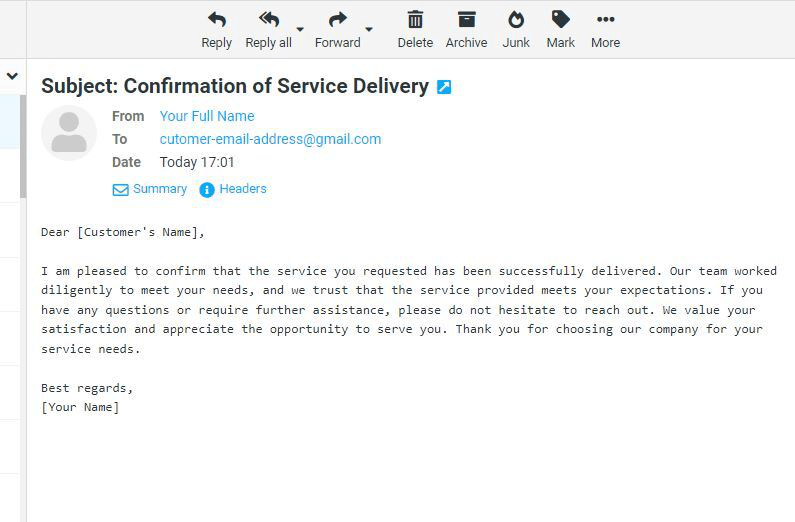
Example: Service delivery confirmation screenshot
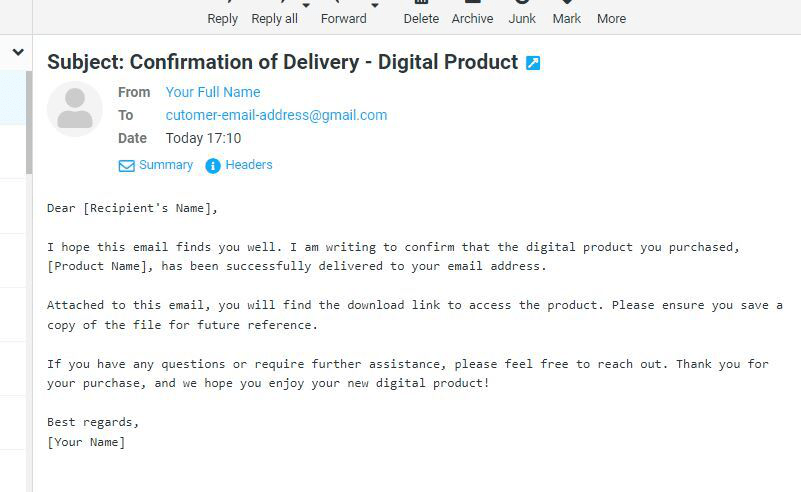
Example: Email proof of digital product delivery
D.3 — What happens after you submit all documents?
Once you have submitted all the required documents for your PayPal limit for high-risk merchants case, the review process begins. PayPal typically takes between 24 hours and 3 working days to review your submission. During this time, do not send multiple follow-up messages as this can slow down the process.
✅ If your documents are accepted: PayPal will send you an email confirming that your account limitation has been removed. Your funds will be released and you can resume selling normally.
❌ If your documents are rejected: PayPal will ask for additional information or different documents. Do not give up — submit again with better quality documents.
Step E — How to Avoid a PayPal Limit for High-Risk Merchants with Codarab Payment
Even if you successfully restore your account, the core problem remains: as long as you use PayPal as your primary payment gateway for high-risk transactions, you will always be at risk of another PayPal limit for high-risk merchants situation. The real long-term solution is to use a payment gateway specifically designed for high-risk merchants.
Preventing a PayPal limit for high-risk merchants before it happens is exactly what Codarab Payment Gateway Plugin for WordPress was built for.
What is Codarab Payment?
Codarab Payment is a WordPress plugin that integrates directly with WooCommerce. It is specifically built around the concept of high-risk transactions — including the sale of digital products, subscriptions, IPTV services, software licenses, and dropshipping.
The key advantage for any high-risk merchant is that Codarab allows you to accept card payments without exposing the nature of your business to PayPal. This means you can process payments without triggering the automatic review systems that cause PayPal limit for high-risk merchants situations.
In other words, you eliminate the root cause of any PayPal limit for high-risk merchants: your customers pay by card through a secure, professional checkout — and PayPal never sees the details of what you are selling.

PayPal account restored confirmation
Key Features of Codarab Payment Gateway for High-Risk Merchants
- 🔒 Protects high-risk merchants from PayPal account limitations by keeping transaction details private
- 💳 Supports 2D and 3D payment types for maximum compatibility
- ✅ Accept Card Only payments (Visa, Mastercard, etc.) without a PayPal account — a feature not available on standard WooCommerce PayPal versions including PayPal Express and PayPal Smart Buttons
- 🔁 Supports subscriptions and vaulting — perfect for recurring billing, IPTV monthly plans, and membership sites
- 🌍 Available in all countries where PayPal operates — including Eurozone, USA, UK, Africa, North Africa, Asia, and the Middle East
- ⚡ Simple installation and activation — no coding required
- 🛡️ Suitable for IPTV, digital products, dropshipping, technical services, and other high-risk niches
How to Install Codarab Payment Plugin
Installing and activating Codarab Payment Plugin is simple, even if you have never installed a WordPress plugin before. Watch the complete step-by-step tutorial:
📺 How to install and activate Codarab High-Risk Payment Gateway Plugin for WordPress
Apart from that, Codarab Payment Gateway Plugin for WordPress remains the best solution for high-risk merchants who want to integrate Card Processing on their WordPress / WooCommerce stores while permanently eliminating the risk of a PayPal limit for high-risk merchants situation. To learn more, visit the official platform at codarab.com.
📺 Watch: How to Avoid PayPal Disputes When Selling Digital Products
Frequently Asked Questions — PayPal Limit for High-Risk Merchants
Q1: How long does it take for PayPal to remove a limit on a high-risk merchant account?
In most cases, PayPal reviews submitted documents within 24 hours to 3 business days. However, complex cases — especially involving PayPal limit for high-risk merchants situations with large transaction volumes — can take up to 10 business days.
Q2: Can a permanently limited PayPal account be restored?
A permanent limitation is very difficult to reverse and in most cases cannot be lifted. If your PayPal limit for high-risk merchants has become permanent, the best solution is to open a new PayPal account with a different business name and identity, and use a payment gateway like Codarab Payment to avoid future limitations.
Q3: What is the PayPal 180-day limit for high-risk merchants?
The 180-day hold is the harshest form of PayPal limit for high-risk merchants: PayPal holds your funds for 180 days before releasing them. This typically happens when PayPal detects a high chargeback risk. To avoid this, always provide proof of delivery and use a dedicated high-risk payment gateway like Codarab for your most sensitive transactions.
Q4: Does Codarab Payment work without a PayPal account?
Yes. Codarab Payment Gateway allows your customers to pay directly by credit or debit card (Visa, Mastercard) without needing a PayPal account. This is one of the biggest advantages for high-risk merchants who want to accept payments without the risk of PayPal limitations.
Q5: What should I do if PayPal rejects my documents?
If PayPal rejects the documents you sent for your PayPal limit for high-risk merchants case, carefully read the rejection reason in their email. The most common reasons are: document quality too low, missing back of ID card, product description too vague, or delivery proof not matching the customer name on the PayPal receipt. Correct the specific issue and resubmit.
Conclusion: The Complete Solution for PayPal Limit for High-Risk Merchants
Dealing with a PayPal limit for high-risk merchants situation is stressful, but it is entirely manageable when you know what PayPal is looking for. To summarize everything covered in this guide:
- Send a valid proof of identity — passport or ID card (front and back)
- Provide proof of product origin — invoices, licenses, or service recordings
- Write a clear, compliant product description — simple, honest, no red-flag terms
- Submit delivery proof — tracking numbers for physical goods, email screenshots for digital products
- Use Codarab Payment Plugin to prevent future limitations permanently
If you follow these 5 steps, the vast majority of PayPal limit for high-risk merchants cases can be resolved within a few days. And with Codarab Payment Gateway integrated into your WordPress store, you will have a robust, reliable payment solution that works specifically for high-risk businesses — without PayPal ever seeing your transaction details.
📚 Related Articles
- How to install and activate the Codarab Payment solution on your WordPress/WooCommerce store
- Codarab Payment Gateway vs Stripe/Square — Merchant Services Comparison
- Codarab High-Risk Card Processing Payment Gateway for WooCommerce
- Card-Processing Payment Gateway for Your WordPress Store — Try Codarab Payment